
“Agent” became the word of the year, and now every project wants one. Half the time, the task in front of us does not need an agent at all. It needs a script that runs reliably, or a retrieval step that grounds answers in real data. Reaching for an agent first is a bit like buying a forklift to move one box.
Agents are genuinely useful. They are also slower, harder to test, more expensive to run, and more likely to fail in ways you did not predict. So the question worth answering before you build is not “how do we add an agent,” it is “does this task actually call for one.”
Here is the way we sort it out.
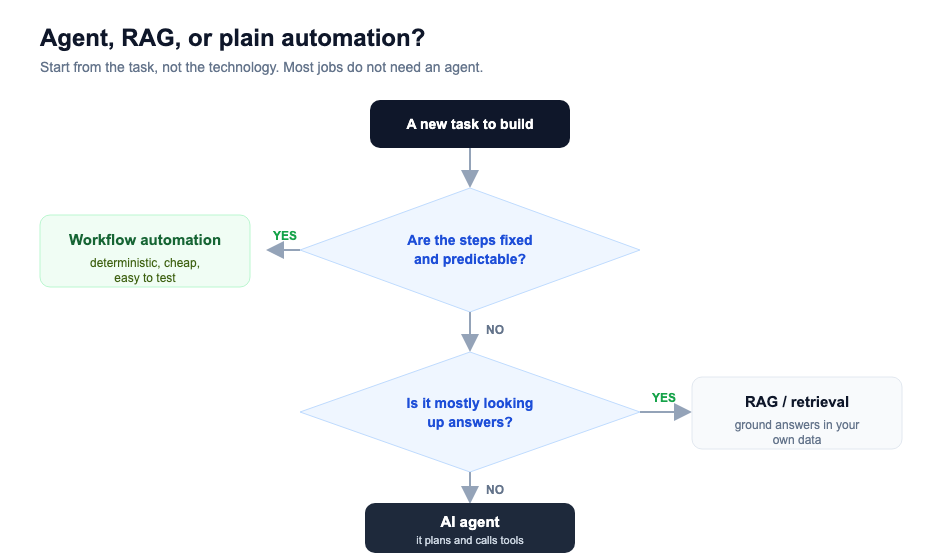
Start with the task, not the technology
Forget the model for a minute and describe the job in plain language. What goes in, what comes out, and how does someone do it today. Once that is clear, the right tool usually picks itself.
Three questions get you most of the way.
Are the steps fixed and predictable?
If the work follows the same path every time, you want plain automation, not AI. “When a form comes in, validate the email, create a record, send a confirmation, notify the team.” That is a workflow. It is deterministic, cheap, and you can write a test that proves it works.
People sometimes bolt a language model onto this kind of task because it feels modern. It usually makes things worse. You take something that ran the same way every time and make it occasionally creative, which is the last thing you want when you are creating invoices.
If the steps are fixed, stop here. Automate it and move on.
Is it mostly looking up answers?
If the job is really “answer questions using our documents,” you want retrieval, not an agent. This is the RAG pattern: find the relevant text, hand it to the model, get a grounded answer with sources.
A support assistant that answers from your help center is a retrieval problem. So is an internal tool that lets staff ask questions across policies and past tickets. These feel like they might need an agent because they involve a model, but adding one buys you complexity and very little else. We wrote more about getting retrieval right here if that is the shape of your problem.
Does it need to decide what to do next?
This is where agents earn their keep. When the path is not fixed, when the system has to look at a situation, choose an action, see the result, and decide again, that loop is what an agent is for.
A research assistant that searches, reads, refines its query, and searches again. A coding helper that runs a test, reads the failure, and edits the file. A workflow where the next step genuinely depends on what the last step found. Those tasks resist a flowchart, and that is the signal.
When you do build one, keep it on a short leash. Give it a small set of tools rather than the whole toolbox. Cap how many steps it can take before it has to stop and ask. Log every action so that when it does something strange, and it will, you can see exactly what it was thinking. An agent without limits is not autonomous, it is just unpredictable.
A quick gut check
| Automation | RAG | Agent | |
|---|---|---|---|
| Steps | Fixed | Fixed-ish | Open-ended |
| Cost | Lowest | Low | Highest |
| Easy to test | Yes | Mostly | Hard |
| Fails how | Loudly | Wrong answer | Unpredictably |
| Reach for it when | The path never changes | You are answering from data | The system must decide |
The honest summary is that most projects we see are one automation and one retrieval step away from done, with no agent in sight. The teams that ship fastest are the ones who resist the urge to make everything clever.
If you are weighing this for a real project and want a second opinion before you commit to an architecture, that is exactly the kind of thing a short advisory engagement is for. Or book a scoping call and we will talk it through.